Sometimes, this is an error you may encounter when trying to upload a Unity -> Xcode build to the App Store after successfully testing it on a phone.
Missing signing identifier at " " file path ~~~ /ProductName.app/Frameworks/UnityFramework.framework/Frameworks/libswiftAVFoundation.dylib.
It is a problem that didn't exist before, but it has been occurring for some time.
The solution is to search for 'swift' in UnityFramework within the Target and change 'Always Embed Swift Standard Libraries' to Yes -> No as shown in the picture below.
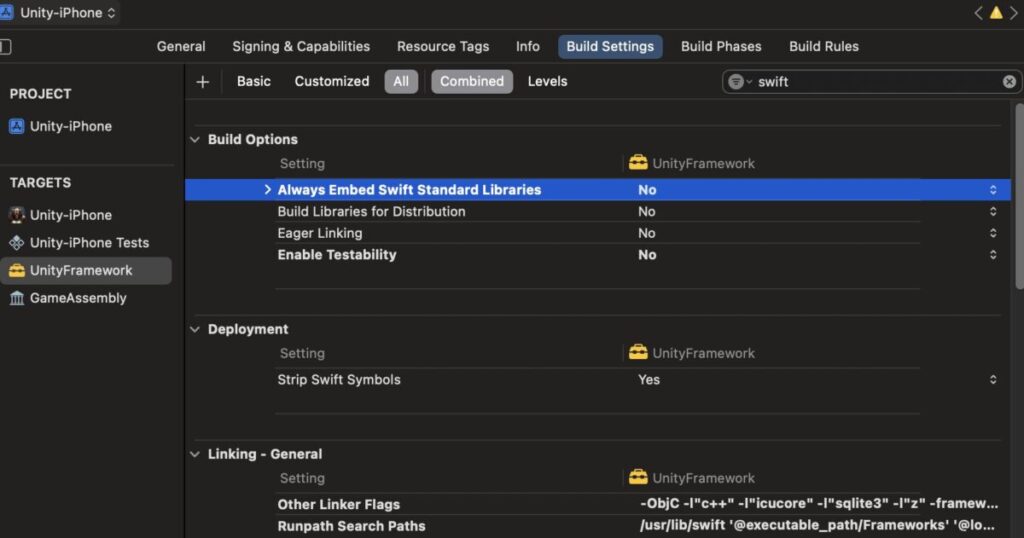
I'm not sure, but I think this issue occurs due to compatibility problems between the libraries provided by Unity and Xcode.
As a Unity developer who doesn't know Swift well.. I don't know why.
Anyway, doing this now allows the app store upload to work fine.