
There was some very interesting and noteworthy news in the AI scene recently. It was the controversy that the Gemini Nano model had been installed in Google Chrome without user consent.
At first, you might think, "Is that really such a big deal?" But this incident is not just about one AI model being added. It sparked considerable backlash as it led to issues involving installation without consent, automatic re-download after deletion, and even controversy over privacy wording. The controversy quickly spread afterward through various media outlets and fact-checks.
In this article, we’ll take a step-by-step look at how this incident started, what was revealed, and why so many people became angry.
How It All Started — How It Came to Light
The incident began with a forensic analysis by Alexander Hanff, a Swedish computer scientist and lawyer. While examining Chrome’s local AppData folder on his Windows system, he discovered that a weights.bin file of about 4GB existed inside a folder named OptGuideOnDeviceModel. This finding became widely known through Hanff’s original post and later coverage by major tech media. (Source: Alexander Hanff’s original post, ghacks article)
The issue is that this file was confirmed to be not just simple cache or temporary data, but a weight file for Gemini Nano, Google’s on-device AI model. In other words, the browser had been downloading and storing an AI model without the user separately consenting to or requesting its installation.

https://www.reddit.com/r/chrome/comments/1jslb22/optguideondevicemodel_folder_taking_up_3gb_have/
Even more surprising was the fact that, even if you deleted this file, Chrome would download it again on the next restart. From the user’s perspective, it was impossible not to feel a strong sense of discomfort, along with the question, "I deleted it, so why is it being installed again?" (Source: Original by Alexander Hanff, The Register report)
I looked up the information above and then checked on my Mac, and sure enough, there was a 4GB file sitting there. In Mac Finder, press shift + cmd + g
~/Library/Application Support/Google/Chrome/OptGuideOnDeviceModeland then enter the folder to view the information for the files inside.
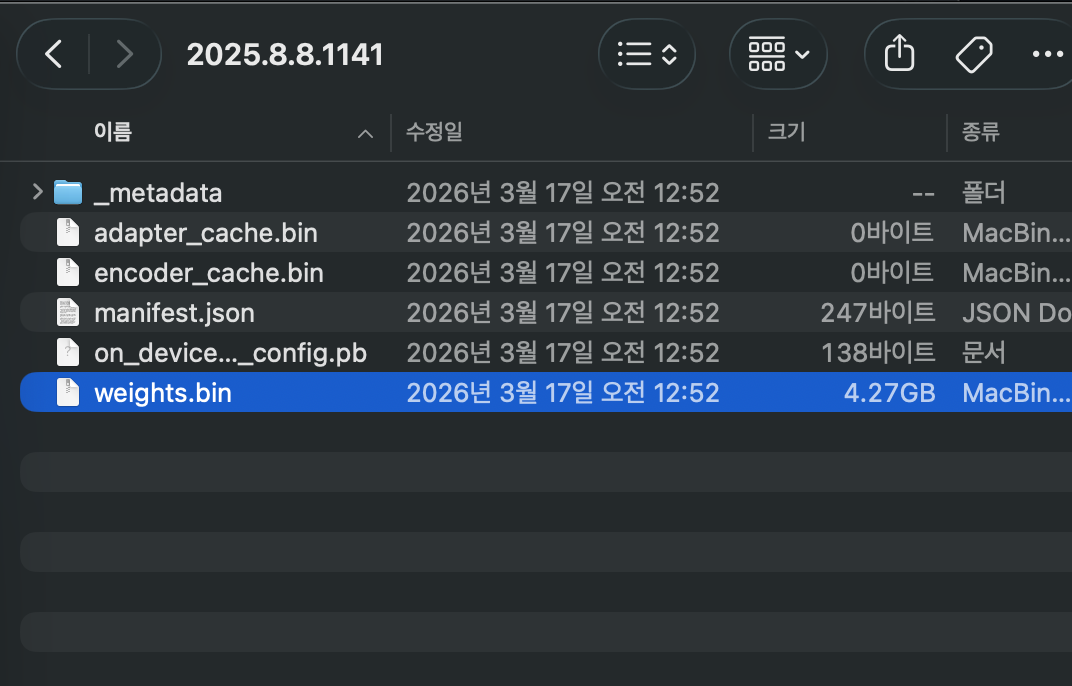
Given that the installation date is shown as March 17, it seems like it may have been handled like a stealth patch for quite some time.
Summary of what was revealed — what was it really?
What later emerged through various media reports and fact-checks was fairly clear. Chrome was automatically downloading the Gemini Nano model file in some environments, and the file was roughly 3 to 4 GB in size. This point was judged to be true in a Snopes fact-check. (Source: Snopes fact-check)
This is a bit shocking and unsettling, but to sum up what has been revealed, here’s the situation.
The reason this part became especially controversial is not simply that "the browser supports AI features", but because a large file was installed without being explained to users. Even if the purpose of the feature was good, if the process is not transparent, backlash is inevitable.
So, what exactly is Gemini Nano? In simple terms, it is a small language model designed to run directly on the device rather than in the cloud. Google has officially described this approach in connection with Chrome's on-device AI features. (Source: Google official Chrome AI explanation)
What kind of model is Gemini Nano?
So what exactly is Gemini Nano? Simply put, it is a small language model designed to run directly on the device, not in the cloud. Google has officially described this approach in relation to Chrome's on-device AI features. (Source: Google's official Chrome AI explanation)
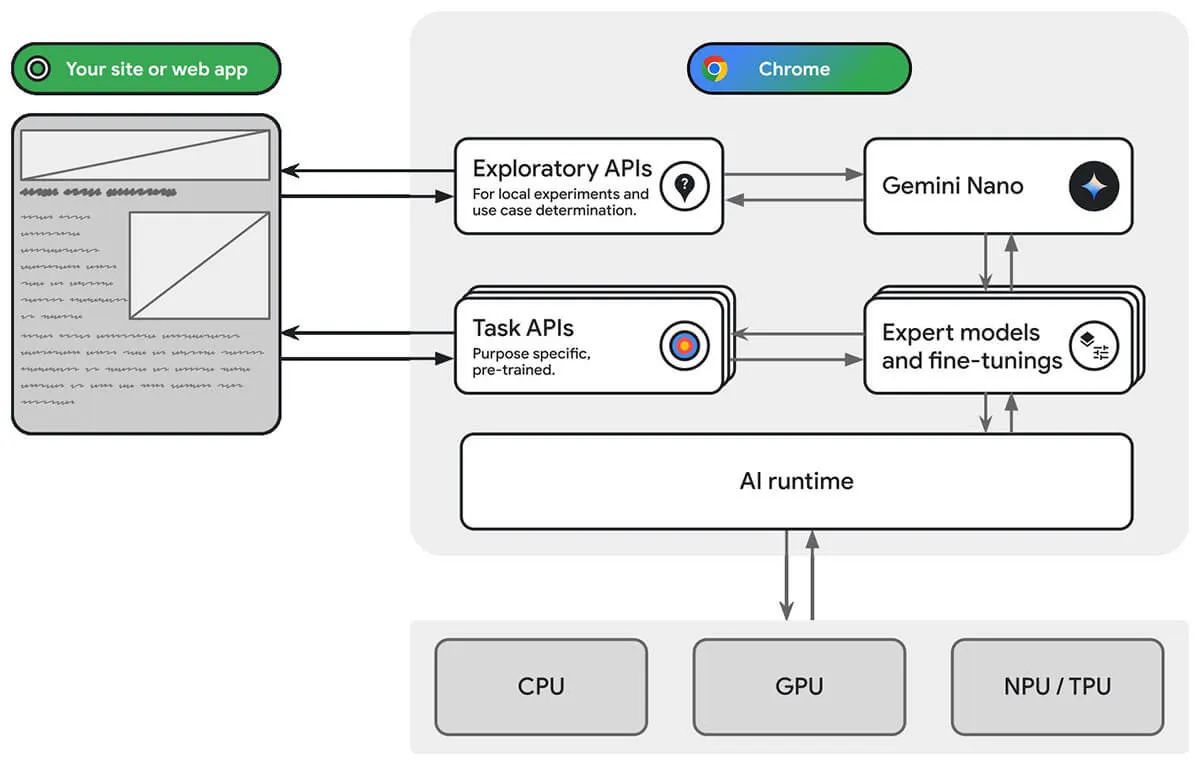
https://developer.chrome.com/static/docs/ai/built-in/chrome-ai-infra_1920.jpg
Google appears to be using this to quickly handle functions like writing assistance, scam detection, summarization, and classification within the browser itself. In other words, the idea of processing things locally instead of sending users’ data to a server is not a bad one.
However, there is a basic limitation: Gemini Nano is not an all-purpose AI. Because of the model’s size and context limitations, it is not suitable for complex reasoning or handling long documents. In the end, it is more accurate to see this model as a "small and fast helper tool" .
Category | What it can do | Limitations |
|---|---|---|
Summary | Short text summarization | Weak with long documents |
Autocomplete | Sentence assistance | Limited in refining consistent style |
Classification | Spam/phishing detection | Hard to handle complex judgments |
Translation | Basic translation assistance | High-quality naturalness is limited |
Reasoning | Simple pattern recognition | Not suitable for complex reasoning |
Google's response and timeline
Google did not make a big announcement from the start, but later came up with several responses. Officially, it maintained the position of "on-device processing for privacy protection", and later began offering some users an option to turn it off in settings. (Sources: Google Chrome AI explanation, Wired)
If you look at the timeline briefly, it goes like this.
Time | Details |
|---|---|
2024 | Gemini Nano begins being installed in Chrome |
February 2026 | Disable option rolled out for some users |
May 4, 2026 | Hanff’s discovery made public |
May 6, 2026 | Coverage spreads across major media outlets |
May 7, 2026 | Google issues clarification |
May 9, 2026 | Privacy wording updated |
Afterward | Controversy continues, with more interpretations and criticism spreading |
Subsequently, reports also said that the explanatory wording related to Chrome's "On-device AI" had been revised. This shows that the controversy went beyond a simple technical issue and led to distrust in Google's communication style itself. (Sources: The Register, Cybernews)
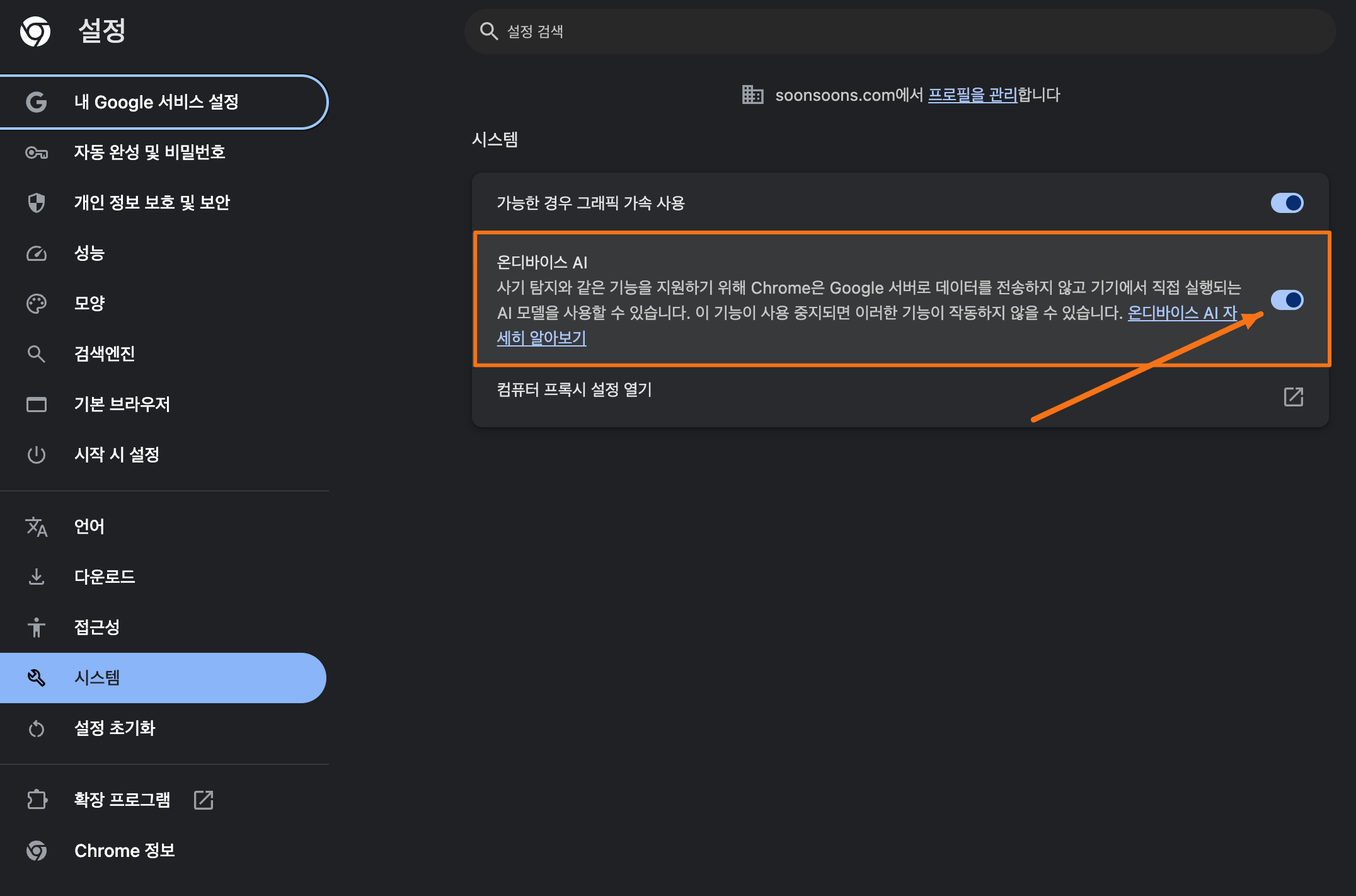
For reference, users can now manually disable it themselves.
In Chrome, you can disable the setting by going to Settings -> System -> "On-device AI" -> Turn off . Then, move to the folder mentioned above. They say you need to delete the file there for it to be completely removed. If you delete it without turning off the setting first, it may be installed again after a reboot. (Yikes)
Community Reaction — Why Did It Spark So Much Noise?
The reason this issue blew up so much bigger was that the community reaction was extremely strong. In particular, users were more sensitive to "why was it installed without my permission?" than to "is the feature good?" This pattern is repeatedly seen in comments, community posts, and roundups of reactions from various tech outlets. (Sources: Hackaday, Malwarebytes, The Register)
The angry side mostly reacted like this.
"It gets installed even when AI features are turned off"
"Reinstalling itself after being deleted is too much"
"At the very least, there should be a consent prompt"
"Why is the method so opaque when privacy is the selling point?"
Meanwhile, those defending it made arguments like these.
"If it’s on-device processing, isn’t that actually better for privacy?"
"Features like spam detection are genuinely useful"
"This could become the norm going forward"
In other words, the key issue was not whether AI is needed or not, but the legitimacy of the rollout method.
Reaction Category | Main Claim |
|---|---|
Outraged side | Installed without consent, reinstalled after deletion, opaque handling |
Supporters | On-device processing protects privacy and provides practical features |
Developers | The API has strong potential, but there are concerns about Chrome dependency |
What, in the end, was the real issue in this case?
The real issue here was not simply the fact that "a 4GB AI model was installed", but rather the automatic installation without user consent and the lack of explanation about it. Technically, there is some merit to the claim that on-device AI can help protect privacy. But from a user experience standpoint, if a large file is installed without my knowledge and gets reinstalled even after I delete it, it’s only natural to feel irritated. (Source: Snopes, The Register)
In the end, this incident leads to the following questions.
"If it’s a good feature, is it okay to add it without consent?"
"Why must the way privacy is protected be transparent?"
"How far can Big Tech go in the name of 'user convenience'?"
The reason so many people were outraged was not that the technology itself was headed in the wrong direction, but that the way it was done broke trust. This case shows all too well that even good intentions can backfire if the process is skipped.
Conclusion
Personally, even as someone who actively uses AI, I think this direction is a natural one.
For simple tasks like spell-checking, security checks, and basic features, I think a culture will take hold in which people use a trusted local AI that’s already installed for free, while more complex work like writing long-form content, analyzing documents, understanding papers, doing formula calculations, and coding will be split off and handled by paid models that users choose to pay for separately.
From that perspective, Google’s move makes sense: Chrome, which dominates the global browser market, along with the Android mobile OS, Google Search, the recent surge of Gemini, Google Workspace, Google Drive, and so on—Google has overwhelmingly built its own ecosystem.
That said, I think the way it was done was seriously wrong.
Perhaps this is one of those events that gives us some glimpse into the fear many people have: "AI has such enormous impact that the company that dominates the technology could end up controlling the world however it wants."

Are innovation and regulation really at odds? Or are they complementary?
AI service providers sometimes argue that the importance of 'innovation' is being held back by 'regulation', while also seeming intent on manipulating users' privacy, choices, and information however they please in the name of usability.
But ultimately, for everyone around the world to safely use AI, and for it to become an essential service, I believe 'safety' and 'transparency' are more important than anything else.
From this perspective, I think this incident has the following implications.
Perspective | Implications |
|---|---|
User | Need to check what the software I use is downloading |
Developer | For AI features, installation and permission design are just as important as the features themselves |
Company | For privacy messaging, communication may matter more than technology |
This incident could easily be dismissed as a simple mishap on Google's part, but at the same time, I think it could become a butterfly effect that brings major changes going forward, both in terms of AI ethics and the growing rise of on-demand AI.
Why don't we take a look at what kinds of changes it might lead to?